top of page
1 - Pause Audio or Turn off TV
Pause audio or turn off TV if you ever experience ongoing sound quality issues.
It is also recommended to pause audio or turn off the TV before moving Receivers to different outlets. Click to learn how to reinstall AUDIO Cu Receivers.

2 - Check Cable Connections

Poor power cable connections may cause Receivers to output reduced quality sound. Make sure all cable connections to the Transmitter, Receivers, TV, and speakers are secure.
3 - Power Cycle Transmitter
Follow instructions to power cycle the AUDIO Cu Transmitter.*
*Recommended: Turn TV off or pause audio first and avoid skipping step 3.
1.Unplug AC power cord from the AUDIO CU Transmitter power input port.
.png)
2. Plug the AC power cord back into the AUDIO CU Transmitter power input port.
.png)
3. Wait ~1 minute before resuming audio or turning on TV
(skipping step may create audio quality issues and require you redo steps 1-2)
4 - Chime to Check Speakers
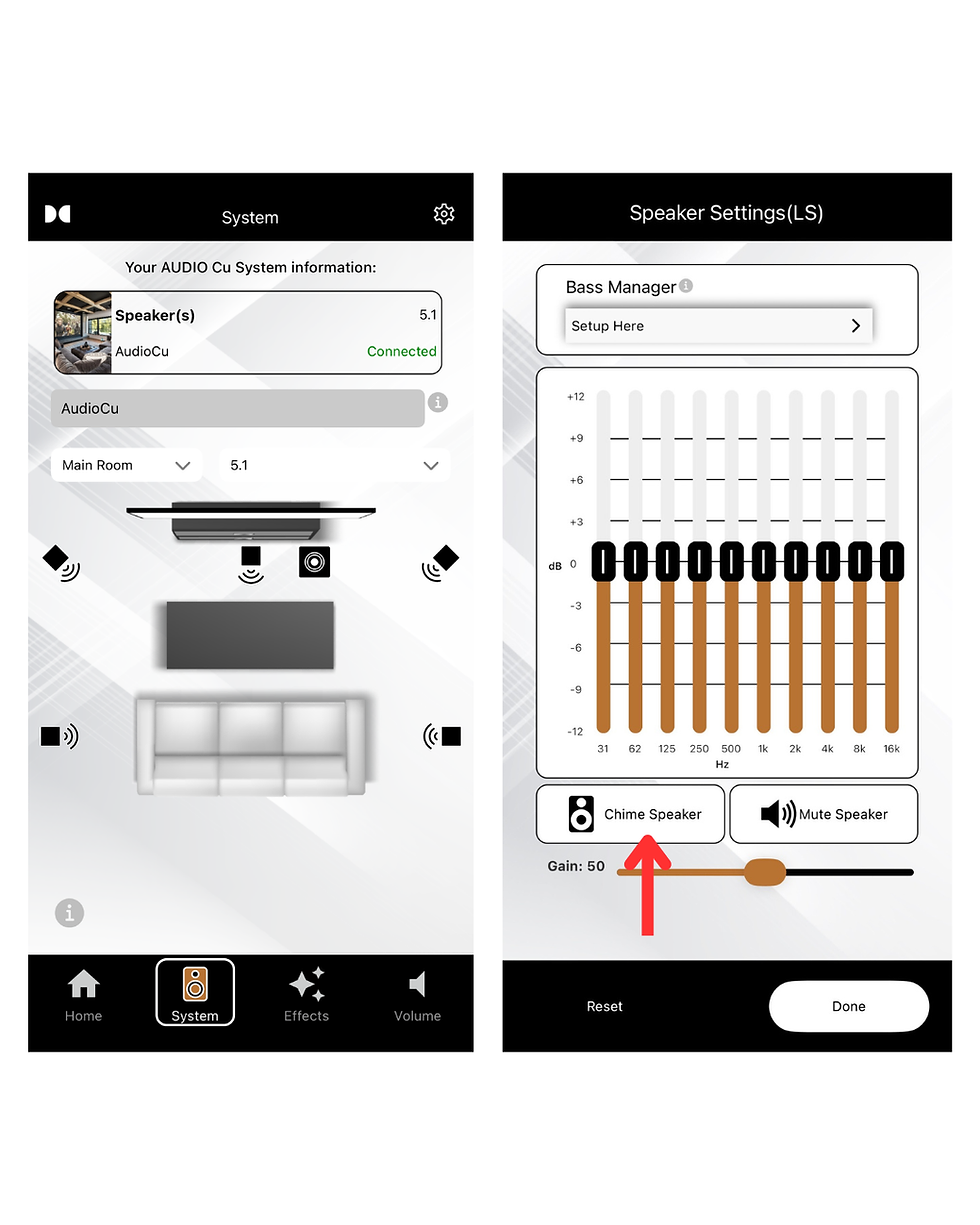
If speaker detection was successful, any previously grey icons will appear black.
If any speakers went missing since the last speaker detection scan, they should appear as grey.
1. On the System page, click the black speaker icon.
2. Hit 'Chime' to chime the speaker.

bottom of page